I am building a 3D physics engine from scratch in C++, with a focus on clean architecture and decoupled system design.
A common issue in many physics engine tutorials is that they tightly couple the simulation with rendering. While this makes demos easier to build, it prevents the engine from being reusable or integrated into other projects.
To avoid this, I started by designing the engine as a standalone static library, separating it completely from the rendering layer. This allows the physics system to be reused, tested, and extended independently.
In this post, I’ll walk through the architectural decisions behind this approach and the development process of my 3D physics engine.
Starting Out
The first real design question I had to answer was: what separates a physics engine from a software that uses that engine? The distinction sounds obvious until you look at most tutorials — they build the engine and demo in the same Visual Studio project, and by the time you finish, you don’t have an engine you can reuse. You have a tangle of dependencies that can’t be separated without starting over. So before writing any physics code, I spent time thinking about decoupling. The engine would be a static library — that’s what makes it actually distributable, linkable against another project, and independently compilable. No recompiling the whole engine just to add a debug print in the demo.
Renderer
My Choice of library was raylib because it is very easy to use and very straight forward. Physics engines are already huge topic so i didn’t want to bother with the OpenGL boilerplate. raylib gives me everything i need a camera, shaders, texture structs, a window and etc. And since it’s simple it could be readable from a person without a prior graphics programming experience.
#include "Physics/ShapeBase.h"
#include "Physics/Body.h"
#include "TransformBuffer.h"
#include "Math/Quat.h"

#define SHADOWMAP_RESOLUTION 2048

class RenderModel
{
public:
	Model model;
	Color color;
	static RenderModel BuildFromShape(Cacti::Body body,Cacti::Shape* shape);

	Vector3 position;
	Cacti::Quat orientation;

	RenderModel() = default;
	RenderModel(Model& model, Color color, Vector3 pos);
	void Draw();
};

class Renderer
{
public:
	Renderer();
	~Renderer() = default;

	void Init();
	void Update();
	void Destroy();

	void AddSceneObject(RenderModel& obj);

	std::vector<RenderModel > sceneObjects;

	void SetTransformBuffer(const Cacti::TransformBuffer* buf) { transformBuffer = buf; }


private:
	TextureCubemap GenTextureCubemap(Shader shader, Texture2D panorama, int size, int format);

	RenderTexture2D LoadShadowmapRenderTexture(int width, int height);
	void UnloadShadowmapRenderTexture(RenderTexture2D target);

	const::Cacti::TransformBuffer* transformBuffer = nullptr; // this points to the actual buffer because we don't want to copy buffer values to another buffer.

	Shader shadowShader;
	int lightVPLoc;
	int shadowMapLoc;

	Vector3 lightDir;
	int lightDirLoc;

	RenderTexture2D shadowMap;
	int textureActiveSlot = 10;

	Cam cam;
	Shader shader;

	Model skyboxModel;
	Shader skyboxShader;
};
This was my first renderer. It was heavily coupled to the Cacti(engine), notice the includes and cacti’s internal transform buffer type. I knew that this shouldn’t be like that.
I solved this by the following approach;
Demo is the layer that knows both the engine and the renderer and it’s like a choreographer. It tells raylib to create a window, engine to initialize, renderer to load it’s shaders, create it’s skybox, create it’s camera and all and inits the scene by allocating some memory for data conversion to prevent future resizing operations and builds scene geometry from the world objects. so it can be a bridge that allows the communication between them. Ok this sounds nice but how?
General Architecture
I decided such a simple architecture that engine writes a “transform buffer” of world objects’s required data to render them and demo layer converts the internal Cacti type data to our raylib type renderer data as like the following:
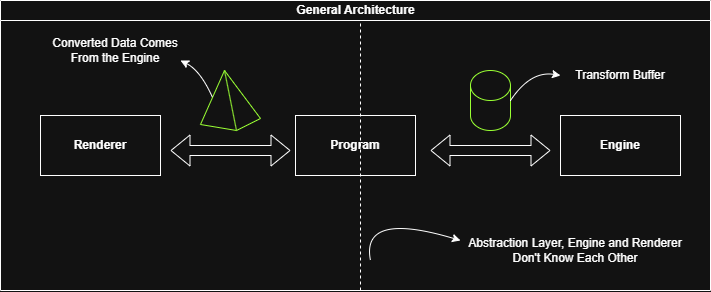
This caused a conversion loop in our game loop but it’s cost is negligible and i don’t want to push data conversion beyond from that because it wasn’t my main interest if it’s gonna be bottleneck in the future i would try to make it parallel.
	while (!WindowShouldClose())
	{
		float dt = GetFrameTime();
		engine.Update(dt);

		for (int i = 0; i < engine.world.bodies.size(); i++)
		{
			const Cacti::Vec3 p = engine.transformBuffer.positions[i];
			const Cacti::Quat q = engine.transformBuffer.orientations[i];

			convertedSceneData.positions[i] = { p.x, p.y, p.z };
			convertedSceneData.orientations[i] = { q.x, q.y , q.z, q.w };
		}

		renderer.Update(convertedSceneData);
	}
Another diagram
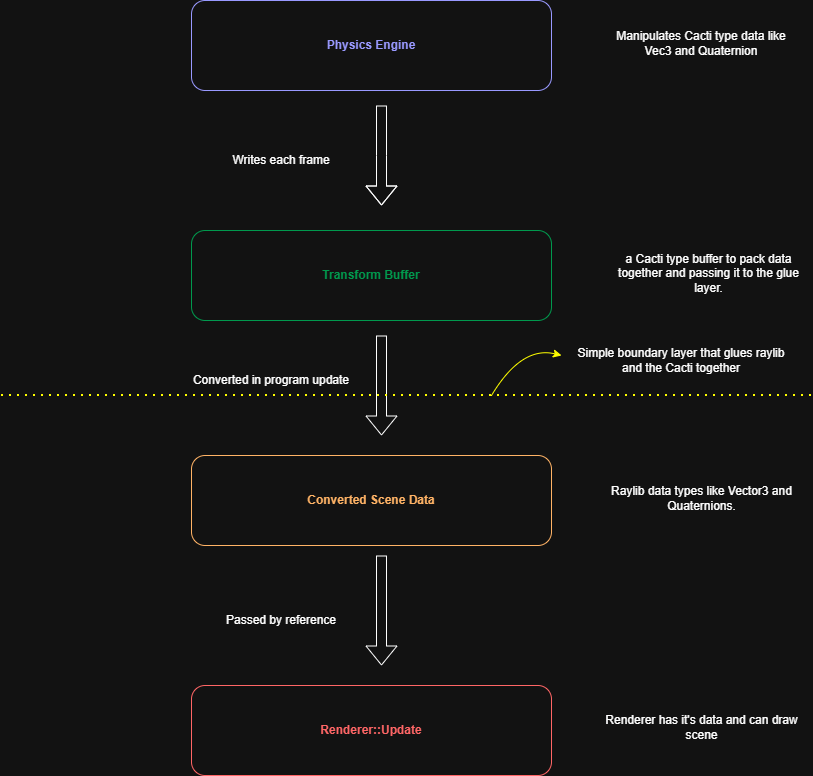
Ok it seems like we solved the data transportation without coupling two different subsystems. But what about this?
“static RenderModel BuildFromShape(Cacti::Body body,Cacti::Shape* shape);”
Basically i used the same approach, i’ve could carry it to the demo layer because it knows both raylib and the engine. And indeed i did this.
void Program::InitScene()
{
	renderer.sceneObjects.reserve(engine.world.bodies.size());

	convertedSceneData.positions.resize(engine.transformBuffer.positions.size());
	convertedSceneData.orientations.resize(engine.transformBuffer.orientations.size());

	for (int i = 0; i < engine.world.bodies.size(); i++)
	{
		RenderModel sceneObject = BuildRenderModelFromPhysicsGeometry(engine.world.bodies[i], engine.world.bodies[i].shape);
		renderer.AddSceneObject(sceneObject);
	}
}
Also i realized that RenderModels don’t need to carry position and orientation data since it’s frame dependent read-only data so since my converted data is a struct of arrays i just draw renderable objects by indexed position and orientation from the arrays in the renderer.
class RenderModel
{
public:
	Model model;
	Color color;

	RenderModel() = default;
	RenderModel(Model& model, Color color);
	void Draw(const Vector3 pos, const Quaternion& orient);
};
Why i didn’t make the render models SoA? Well in this case the bottleneck is not data alignment, it’s how raylib holds Model data in it’s structs. There are various traversal heap allocated fields so that’s make raylib Models already cache-hostile.
typedef struct Model {
    Matrix transform;       // Local transform matrix

    int meshCount;          // Number of meshes
    int materialCount;      // Number of materials
    Mesh *meshes;           // Meshes array
    Material *materials;    // Materials array
    int *meshMaterial;      // Mesh material number

    // Animation data
    int boneCount;          // Number of bones
    BoneInfo *bones;        // Bones information (skeleton)
    Transform *bindPose;    // Bones base transformation (pose)
} Model;
So yeah that’s enough renderer performance for my case after all, I’m not going to create an industry-standard physics engine.
So i successfully decoupled the subsystems so that in future if want to i can change my renderer or create demos in different graphics libraries or i can distribute my physics engine as a static library easily. These were my initial working progress from this point i will upload my logs daily because i decided to keep a devlog after some progress.
One last thing before the close-up today, i decided to keep bodies aa stack allocated in bodies vector of the world to make them cache friendly and
You can check the initial state of the project from here
One important notice, after you compile the code copy and paste the resources folder to the out/build/Debug(or release) so the same folder with our exe otherwise it couldn’t be able to find shaders and textures.
I will use “scene objects” to refer renderable, visual representations of our objects and “world objects” to our physical objects that collide and interact with their environments.
Day 1
I moved from raw shape pointers to unique pointers in bodies to solve ownership confusion. This required more changes in the codebase for example now body initalization list moves shape pointer to the bodie’s shape member variable because unique pointers doesn’t allow copying so ownership of the pointer of the initialized shape is moves to the body.
	Body::Body(std::unique_ptr<Shape> shape, Vec3 position)
		:position(position), orientation(Quat(0,0,0,1)), shape(std::move(shape))
	{
	}
Also BuildRenderModelFromPhysicsGeometry function takes body as reference now because unique pointer doesn’t allow to copy body to a function either and to pass raw pointer as a second argument i had to use get() function,
Day 2
I did some system description. Because of my previous experiments i knew my system of the engine should be look like the following
“Every frame the engine takes a list of objects in the world, applies impulses(gravity, drag, etc.), checks if any of them are touching or overlapping, resolves those contacts by applying contact impulses then updates their positions and rotations for the next frame.”
Nouns
Engine, object, world, impulse, intersection, contact,
Verbs
Resolve, update
Implemented sphere-sphere intersection test, studied why some engines populate contact points as local space some as world space and learned that when you store contact points in world space it causes floating point drifting and can be error-prone because objects’ position changes constantly and contact world points became stale and need to being re-calculated in the each frame and impulse solvers re-uses the same contact points so keeping contact in world space makes the calculations stable.
In the other hand keeping world space contact points is beneficial for user/ game code because user can play sounds, create particles and etc. at the world points.
Erwin Coumans (Bullet’s author) explicitly described it this way in the Bullet forums: keep contacts in local space, transform to world each frame only to validate them.
In summary
-
World space → simpler, fine for non-persistent one-shot solvers
-
Local space → necessary for persistent manifolds, warm starting, and stable stacking behavior
I’m sticking with the local space caching.
Day 3
I studied world space to local space vector conversion and implemented the classic conversion which benefits from quaternions.
Basically i translate the coordinate space by substracting body’s position from the vector’s world position (remember graph translations from high school) then i create a new quaternion and filling the x, y, z members by using the coordinates of the translated vector and then i apply quaternion rotation to it.
\[\mathbf{v'} = q \, (0, \mathbf{v}) \, q^{-1}\]where $q$ is a rotation quaternion $v$ is a vector we need to convert from world space to local space and $q^{-1}$ is the inverse of the rotation quaternion.
Finally $\mathbf{v’}$ is the translated local point of a body from the world space.
Furthermore i implemented sphere-sphere collision test and visual debugging to check my coordinate transformations are correct.
Here’s the debug visualizations of a contact:
Day 4
I studied momentum and impulse relationship, mainly to understand their role in collision resolution. Momentum and impulses bridge mass and velocity relationship, this saves us from a “velocity guess” of collided objects and tells velocities of collided objects with respect to their massess.
Also i tried to answer why don’t we just calculate a collision force and apply it to the objects? If we do this, we would need to integrate the force over time to update the velocity, which is computationally expensive and can introduce instabilities, especially over very short collision durations. Impulses, on the other hand, model collisions as instantaneous changes in velocity, making them more suitable for discrete, step-by-step simulations on a CPU.
Furthermore read Lisitsa Nikita’s great blog post about quaternions to learn and implement my quaternion class, it’s one of the best resources on this topic, he doesn’t just provide the formulas; he explains their mathematical basis. Great for those who are curious about the why.
Day 5
After some reading and a quaternion class implementation finally i managed to rotate my bodies. I don’t discuss why do we use quaternions for representing our orientations in here again because there are tons of great explanations on the web.
But my insights are just don’t be scared of it, the core ideas are; Rotation vectors (axis-angle) - actually in the end our angular velocity is our rotation axis and angle -, how quaternions encode angles and creating a new orientation quaternion in each frame and multiply it with the member one and then changed the member with it. That wasn’t intuitive for me i guess because of i’m familiar with doing things in “OOPy” way that store object’s state and manipule them inside in the object’s encapsulated environment.
	void Body::Update(float dt)
	{
		float angle = angularVelocity.GetMagnitude() * dt;
		Vec3 axis = angularVelocity.Normalized();
		Quaternion deltaRotation(axis, angle);
		orientation = deltaRotation * orientation; // this order works for world space rotations.
		orientation.Normalize();
	}
Here’s the result!
Day 6
I started to implementing collisin resolution. As like other engines my engine also response collisions in two steps;
- Collision detection.
- Collision Resolution.
I populate contact structs in the detection step and solve them in resolution step as independently from the collision type (box - sphere or sphere-sphere, etc.)
At first i just depenetrated collisions but i shocked how unstable it is and tried to find mathematical errors in the steps;
after few mins of debugging and flipping equations i realized that i don’t clear forces from the bodies(i was applying gravity in each frame) at the frame end. After some time little sphere’s velocity increase dramatically and causes the instability. So as a collision resolution i just divide it’s velocity by two and this is my initial collision response and just for now i just gave little sphere initial velocity without applying gravity for the sake of simplicity;
Day 7
I studied linear collision resolution and implemented The Universal Impulse Formula
Great!?
Turns out when i changed the constructor of bodies i didn’t realize that i pass invMass = 0 to the little sphere. So in impulse calculation i was dividing by zero since big sphere is also has zero inverse mass.
What now??
My vector class populates all of the 3 components of a vector by assigned float value and since i mistakenly try to assign dot product result (which is a float) to a vector it populates the same value to all of the vector components. So yeah little sphere additionally gains x and z velocity after collision even it’s collides compeletely perpendicular to the ground.
Great view!!
Finally i can solve linear collisions.
Day 8
When i tried to work on angular collision resolution i realized that i have major gaps in linear algebra and transformations in general so that i started to read relevant sections of 3D Math Primer For Graphics and Game Developers book and game physics in one weekend book, sure i could copy and paste code but i want to stick with the hard route.
Day 9
I learned that rotation and reflection matrices are orthogonal furthermore;
\[M \text{ is orthogonal } \iff M^T = M^{-1}\]
That’s means that i can use transpose operation instead of expensive inverse operation on my rotation matrices.
some note from the book;
you will find that it is just about the same number of operations involved as converting the quaternion to the equivalent rotation matrix (by using Equation (8.20), which is developed in Section 8.7.3) and then multiplying the vector by this matrix. Because of this, we don’t consider quaternions to possess any direct ability to rotate vectors, at least for practical purposes in a computer.
Day 10
I implemented Matrix functions, inertia tensor world space transformations. and i’m reading 3D Math Primer book.
some notes from the book;
Now, typically in a physics simulation, you only need the inverse inertia tensor; similar to how you really only need to store the inverse mass, as opposed to the mass of a body.
it’s common to keep on hand redundant copies of the orientation in alternate formats. Typically, both a quaternion and rotation matrix are maintained.
Day 11
i implemented the general impulse formula but i realized that my program doesn’t produce orientation from angular velocities even i saw with m own my eyes that bodies gain angular velocity from the impulse and as you know in previous tests initial angular velocity creates orientation seems normally.
Day 12
After 3 hours of debugging i found that the problem emerges from the distinction of the following functions;
btw i hadn’t trust the ai chatbots because claude did terrible job of identifying the issue and bringing math logic together.
	inline const Vec3& Vec3::Normalize() {
		float mag = GetMagnitude();
		float invMag = 1.0f / mag;
		if (0.0f * invMag == 0.0f * invMag) {
			x *= invMag;
			y *= invMag;
			z *= invMag;
		}
		return *this;
	}

	inline Vec3 Vec3::Normalized() const {
		Vec3 copy = *this;
		copy.Normalize();
		return copy;
	}
Because in body update i’ve been creating new axis by c# Vec3 axis = angularVelocity.Normalized(); I wrote that function to avoid overriding the angular velocity, but apparently I shouldn’t have.
it solved the unrotation problem but another problem came to the vision that is sometimes my angular velocity in collision resolution being calculated as reversed for some reason. While trying to solve this issue i realized that my WorldSpaceToLocalSpace was wrong and local-world conversion were being miscalculated, i fixed it but this doesn’t solve the problem.
a note for myself:
The broader principle: whenever you write a function and its inverse, test the round-trip immediately. WorldToLocal/LocalToWorld, serialize/deserialize, compress/decompress — these always come in pairs and the round-trip test is cheap to write and catches both wrong-order and wrong-reference bugs instantly.
// At startup, before any simulation runs: Vec3 worldPoint = Vec3(1, 2, 3); // arbitrary Vec3 local = body.WorldSpaceToLocalSpace(worldPoint); Vec3 backToWorld = body.LocalSpaceToWorldSpace(local); // backToWorld should equal worldPoint assert((backToWorld - worldPoint).GetMagnitude() < 0.001f);
If that assertion fires, you know immediately that one of the two functions is broken, and you’ve isolated the problem to that pair before any rendering or physics runs.
Day 13
Silly me…!!! past 3 days i’ve been trying to figuring out in fury why does my angular velocity being reversed in collision resolution. However i didn’t even stopped and ask myself, wait a second there’snt any friction that can cause rotation or torque so why would my spheres should even rotate in the first place…
Oh god… btw i changed my math classes with the oneweekendphysics book’s because i was so angry that i thought maybe copying and pasting everything related with the math implementations can solve the issue and guess what it wasn’t.
So this showcased another problem that is why do my spheres rotate on collision when there is no friction at all?
Day 14
It turns out the problem was in the impulse calculation,C# Vec3 r = impulsePoint - position components of r drifts so r starts to become unparallel to the impulse point then this creates torque, then Vector::Normalize() normalizes angular velocity and overwrites it as (0,0,+-1) depending on the drift. So the sphere “sometimes” rotates in +z direction sometimes in -z direction. Yeah…
After realizing that i stopped overwriting the angular velocity by Normalizing it and implemented tangential impulses for friction and for now i won’t consider static frictions. I read this is more stable in impulse based physics engines.
Alessandro Di Gioia: as a software engineer our biggest most important responsibility is to understand the problem space and define it very well before we can even start thinking about the solution space.
Fred Brooks: “Show me your flow charts and conceal your tables, and I shall continue to be mystified. Show me your tables, and I won’t usually need your flowcharts; they’ll be obvious.” to write or understand software, a good place to start is a description of the data that are being operated on.
Day 15
Started to research continuous collision detection.
Day 16
Implemented my first continuous collision detection and it worked(seemingly)! But yeah, it wasn’t a robust implementation from an arcihtectural and engineering standpoint.
Day 17
I’m studying the gamephysicsweekend’s CCD implementation, it takes too much time to understand imo author don’t give enough explanations about why, instead they give you code and explains how.
Day 18
I studied implemented continous collision detection and time slicing but i hit a bottleneck issue.
I profiled my code and realized that debug rendering and contact copying in the program was the bottleneck because of the size of the array and rendering calls.
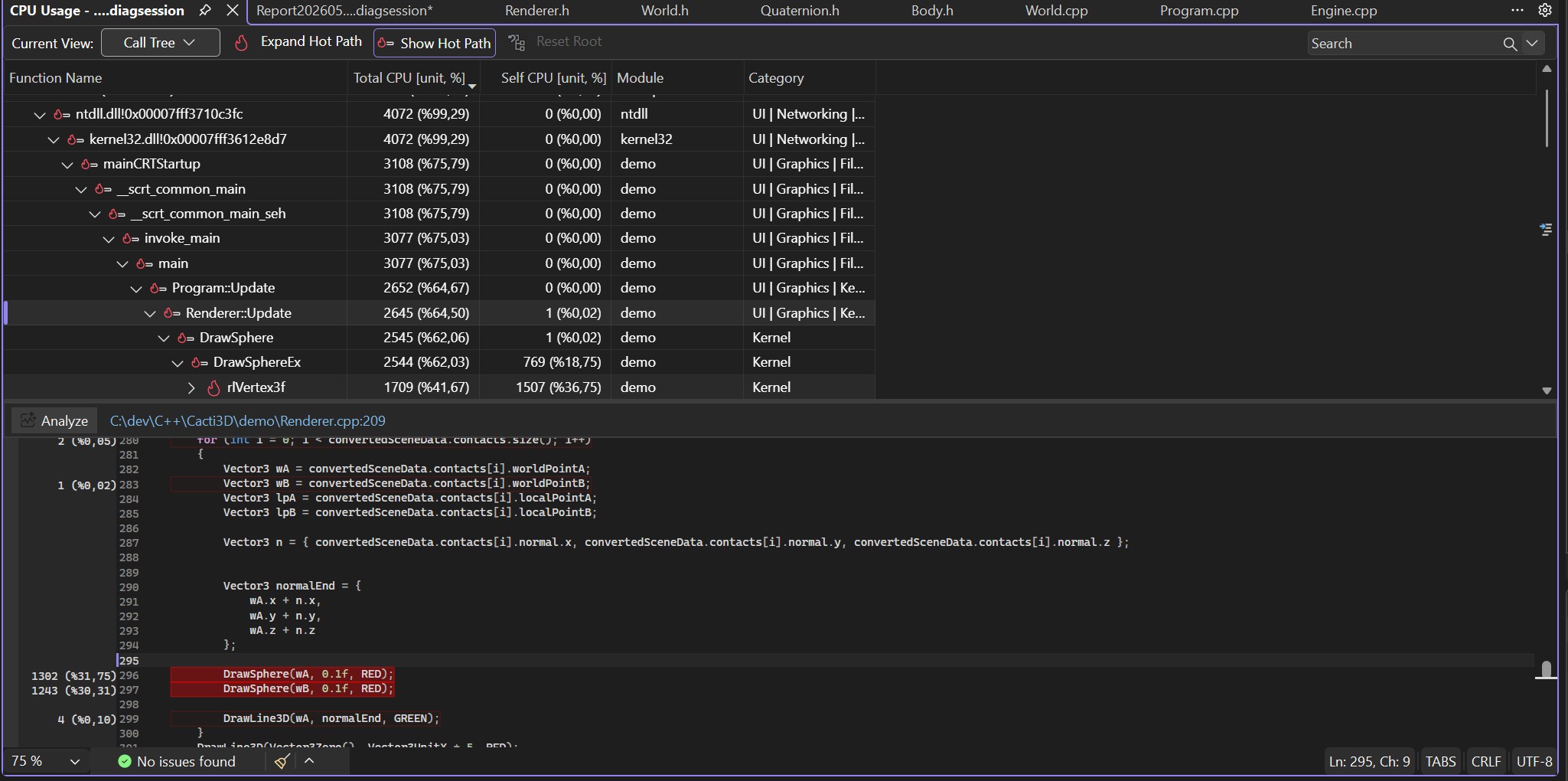
When i loop only happening collisions the problem solved or just simply cut it out.
Day 19
Here’s my insights about some of my key foundings about CCD because studying it is hard maybe this can help someone;
Ok so first don’t forget that CCD is a collision detection problem not a collision resolution problem.
Somehow, you need to find a “time” within the discrete time steps where the collision is expected to occur.
To find such a time you cast something and intersect with something in sphere-sphere case it’s a sphere.
However dynamic-dynamic sphere intersection tests is hard to solve.
So you make a simplification and decrease the problem into ray-sphere static intersection by calculating the relative velocity and assuming that sphere B is static and sphere A is just a point(ray) and by using Minkowski Sum you try to find an intersection of a ray and a sphere C that is as big as the sum of the radii of A and B.
But the math gives us parametric time results like t = 0 for ray origin and t=1 for the furthest ray distance point. Like if you shoot the ray from A to B then it’s at A when t = 0 and at B at t = 1. If it’s collide a sphere at some point in between it returns to us a t value in [0,1].
This is compeletely irrelevant for our physics engine because we need exact time not some ratio to calculate exact collision points and also sorting the collisions by their time otherwise we could resolve collisions in wrong order and we can observe ghost collisions or unexpected collisions.
So we scale the t1 and t2 result of the intersection test by dt.
Okay we found the collision times in two seperate frames now what? How do we manage this fragmented situation?
We do time slicing!
- We’re in a frame.
- As usual apply forces or impulses.
- Test contacts. (we know until this point)
- Now, we need an contact array to sort the contacts. So add found contacts to this array from the previous step.
- Sort contacts.
- Here’s the hard part: We have some contacts and their times that would happen before the next frame but not in this frame that we need to handle.
- start a stopwatch.
- So for each contact integrate all of the bodies to that “contact time” and resolve only the current contact. Add the passed time to the stopwatch.
- if the remaining time(dt - stopwatch time) is bigger than 0 then update all of the bodies by the remaining time.
Day 20
Implemented Sweep And Prune broadphase collision detection with AABBs but it didn’t worked out properly. It’s narrowing absolutely nothing.
Day 21
I debugged and realized that since i’m keeping everything static in the broadphase class and not calling the constructor -that is where i initialize my projection axis- my projection axis was automatically being initialized as Vec3(0,0,0). After fixing it and changing the class from static to normal my implementation starts to narrow collision candidates.
Also when i tried to render AABBs i realized that i wasn’t calling the AABB update function so after initialization those became stale.
It works good but keep in mind that also generates false positives.
Here’s some results for 626 bodies.
Brute Force Test Count: 195625
Collision Pairs Count: 7746
Found Contacts Count: 265
Brute Force Test Count: 195625
Collision Pairs Count: 7742
Found Contacts Count: 243
Brute Force Test Count: 195625
Collision Pairs Count: 7723
Found Contacts Count: 247
Brute Force Test Count: 195625
Collision Pairs Count: 7710
Found Contacts Count: 220
Approximately %96 narrowing. When world is sparse it narrows approx. by %98.
Still it’s not perfect and generates lots of false positives but imo it’s decent enough for learning phase.
std::cout « “Brute Force Test Count: “ « (numBodies * (numBodies - 1)) / 2 « “\n”;
std::cout « “Collision Pairs Count: “ « collisionPairs.size() « “\n”;
std::cout « “Found Contacts Count: “ « numContacts « “\n”;
You can observe that when objects are close to each other it doesn’t really improve the performance but after the first change it greatly narrows the collision tests.
Day 22
One final thing for moving from the broad phase, that is i had to consider velocities of bodies and need to expand AABBs with respect to the velocities of the objects.
If you don’t then broadphase couldn’t be able to catch collisions between fast moving objects because of AABBs only provide data about their “current” positions so that it can also tunnel objects.

Here’s the step by step visualization.
And Here’s the collision detection. Since the velocity is so high i couldn’t be able to see it’s path.
Day 23
I implemented Box shape class and box builder function for raylib and rendered it.
When i tried to apply gravity impulse to my box it starts to rotate back and forth
After some debugging, i realized that my body update function actually never been transforming inertia tensor from local space to world space. after correctly transforming it seemed like ok but…(?)
Box started to incline towards it’s some vertices without an external force except gravity. For a few hours i thought it’s another floating point drift problem that causes rotation and tried to stop normalizing rotation axis and stuff but when i tried to give an initial angular velocity in x direction the problem appeared instantly.
I knew that rotation had to occur around the rotation axis. which passes through the “center of mass” of an object but clearly rotation is around some vertices so the problem was my misscalculation of the center of mass of boxes. For primitive types like spheres and boxes center of mass is (0,0,0) at least in physics engines, if you forget that like me then you’re in a big trouble because everything works around this assumption.